









































New to KubeDB? Please start here.
PostgreSQL Alerting with Prometheus
This tutorial shows you how to configure Prometheus-based alerting for a KubeDB-managed PostgreSQL instance using the postgres-alerts Helm chart, and how to visualise live metrics using the kubedb-grafana-dashboards chart.
Before You Begin
At first, you need to have a Kubernetes cluster, and the kubectl command-line tool must be configured to communicate with your cluster. If you do not already have a cluster, you can create one by using kind.
Install KubeDB operator in your cluster following the steps here.
You need a running kube-prometheus-stack with the Prometheus operator. This tutorial assumes the Prometheus instance is configured with both
serviceMonitorSelectorandruleSelectormatching the labelrelease: prometheus.To check your Prometheus selectors:
$ kubectl get prometheus -n monitoring -o jsonpath='{.items[0].spec.ruleSelector}'
{"matchLabels":{"release":"prometheus"}}

$ kubectl get prometheus -n monitoring -o jsonpath='{.items[0].spec.serviceMonitorSelector}'
{"matchLabels":{"release":"prometheus"}}
To learn how Prometheus monitoring works with KubeDB in general, please visit here.
We are going to deploy the database in the
demonamespace.$ kubectl create ns demo namespace/demo created
Note: YAML files used in this tutorial are stored in docs/examples/postgres folder in GitHub repository kubedb/docs.
Overview
The diagram below shows the full alerting architecture — from PostgreSQL metric export through to alert delivery and Grafana visualisation.
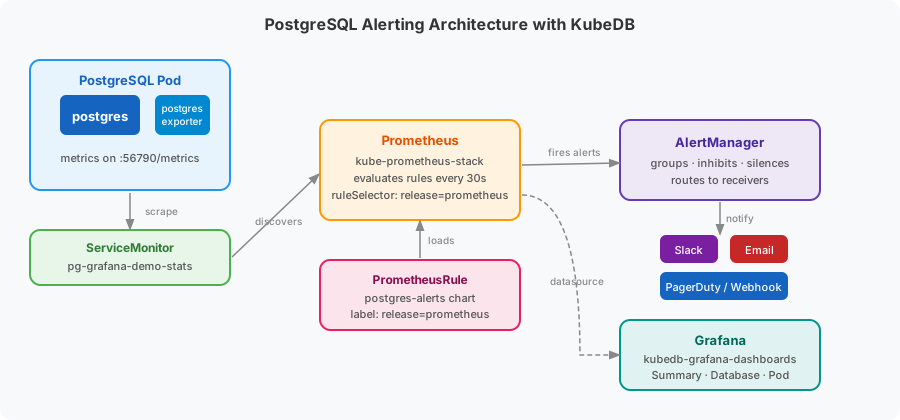
- KubeDB deploys PostgreSQL with a built-in
postgres_exportersidecar that exposes metrics on port56790. - ServiceMonitor (named
{postgres-name}-stats) is created automatically by KubeDB and tells Prometheus to scrape the exporter every 10 seconds. - PrometheusRule is created by the
postgres-alertschart and contains all PostgreSQL alert definitions. Prometheus loads it because it carries therelease: prometheuslabel matching theruleSelector. - Prometheus Operator evaluates every rule expression every 30 seconds and fires matching alerts to AlertManager.
- AlertManager groups, inhibits, and silences alerts, then routes them to configured receivers (Slack, email, PagerDuty, webhook, etc.).
- Grafana visualises metrics through pre-built dashboards provisioned by the
kubedb-grafana-dashboardschart.
Deploy PostgreSQL with Monitoring Enabled
At first, let’s deploy a PostgreSQL database with monitoring enabled. Below is the PostgreSQL object we are going to create.
apiVersion: kubedb.com/v1
kind: Postgres
metadata:
  name: pg-grafana-demo
  namespace: demo
spec:
  version: "13.13"
  deletionPolicy: WipeOut
  storage:
    storageClassName: "standard"
    accessModes:
    - ReadWriteOnce
    resources:
      requests:
        storage: 1Gi
  monitor:
    agent: prometheus.io/operator
    prometheus:
      exporter:
        port: 56790
      serviceMonitor:
        interval: 10s
        labels:
          release: prometheus
Here,
spec.monitor.agent: prometheus.io/operatortells KubeDB to create aServiceMonitorresource managed by the Prometheus operator.spec.monitor.prometheus.serviceMonitor.labels.release: prometheusadds therelease: prometheuslabel to the createdServiceMonitor, matching the PrometheusserviceMonitorSelectorso the target is discovered automatically.
Let’s create the PostgreSQL resource.
$ kubectl apply -f https://github.com/kubedb/docs/raw/v2026.6.19/docs/examples/postgres/monitoring/pg-grafana-demo.yaml
postgres.kubedb.com/pg-grafana-demo created
Now, wait for the database to go into Ready state.
$ kubectl get postgres -n demo pg-grafana-demo
NAME              VERSION   STATUS   AGE
pg-grafana-demo   13.13     Ready    2m
KubeDB creates a dedicated stats service with the -stats suffix for monitoring.
$ kubectl get svc -n demo --selector="app.kubernetes.io/instance=pg-grafana-demo"
NAME                    TYPE        CLUSTER-IP      EXTERNAL-IP   PORT(S)     AGE
pg-grafana-demo         ClusterIP   10.43.6.170     <none>        5432/TCP    2m
pg-grafana-demo-pods    ClusterIP   None            <none>        5432/TCP    2m
pg-grafana-demo-stats   ClusterIP   10.43.181.56    <none>        56790/TCP   2m
KubeDB also creates a ServiceMonitor that tells Prometheus where to scrape.
$ kubectl get servicemonitor -n demo
NAME                    AGE
pg-grafana-demo-stats   2m
Verify that the ServiceMonitor carries the release: prometheus label so Prometheus discovers it.
$ kubectl get servicemonitor -n demo pg-grafana-demo-stats \
    -o jsonpath='{.metadata.labels.release}'
prometheus
Step 1 — Install postgres-alerts
The postgres-alerts chart creates a PrometheusRule resource containing all PostgreSQL alert definitions grouped by concern: database health, provisioner, ops-manager, backup, and schema manager.
Why the release: prometheus label matters
The Prometheus ruleSelector only loads PrometheusRule resources that carry release: prometheus. The chart default label is release: kube-prometheus-stack, so we must override it at install time.
Install
$ helm upgrade -i postgres-alerts oci://ghcr.io/appscode-charts/postgres-alerts \
    -n demo \
    --create-namespace \
    --version=v2026.2.24 \
    --set metadata.release.name=pg-grafana-demo \
    --set metadata.release.namespace=demo \
    --set form.alert.labels.release=prometheus
| Flag | Value | Purpose |
|---|---|---|
metadata.release.name | pg-grafana-demo | Scopes every PromQL expression to this instance |
metadata.release.namespace | demo | Scopes every PromQL expression to this namespace |
form.alert.labels.release | prometheus | Matches the Prometheus ruleSelector so the rules are loaded |
Verify the PrometheusRule is created
$ kubectl get prometheusrule -n demo
NAME              AGE
postgres-alerts   30s
Confirm the release: prometheus label is present.
$ kubectl get prometheusrule -n demo postgres-alerts \
    -o jsonpath='{.metadata.labels.release}'
prometheus
Confirm Prometheus loaded the rules
Port-forward the Prometheus UI and open the Status → Rule health page.
$ kubectl port-forward -n monitoring \
    svc/prometheus-kube-prometheus-prometheus 9090:9090
Open http://localhost:9090/rules and search for postgres.
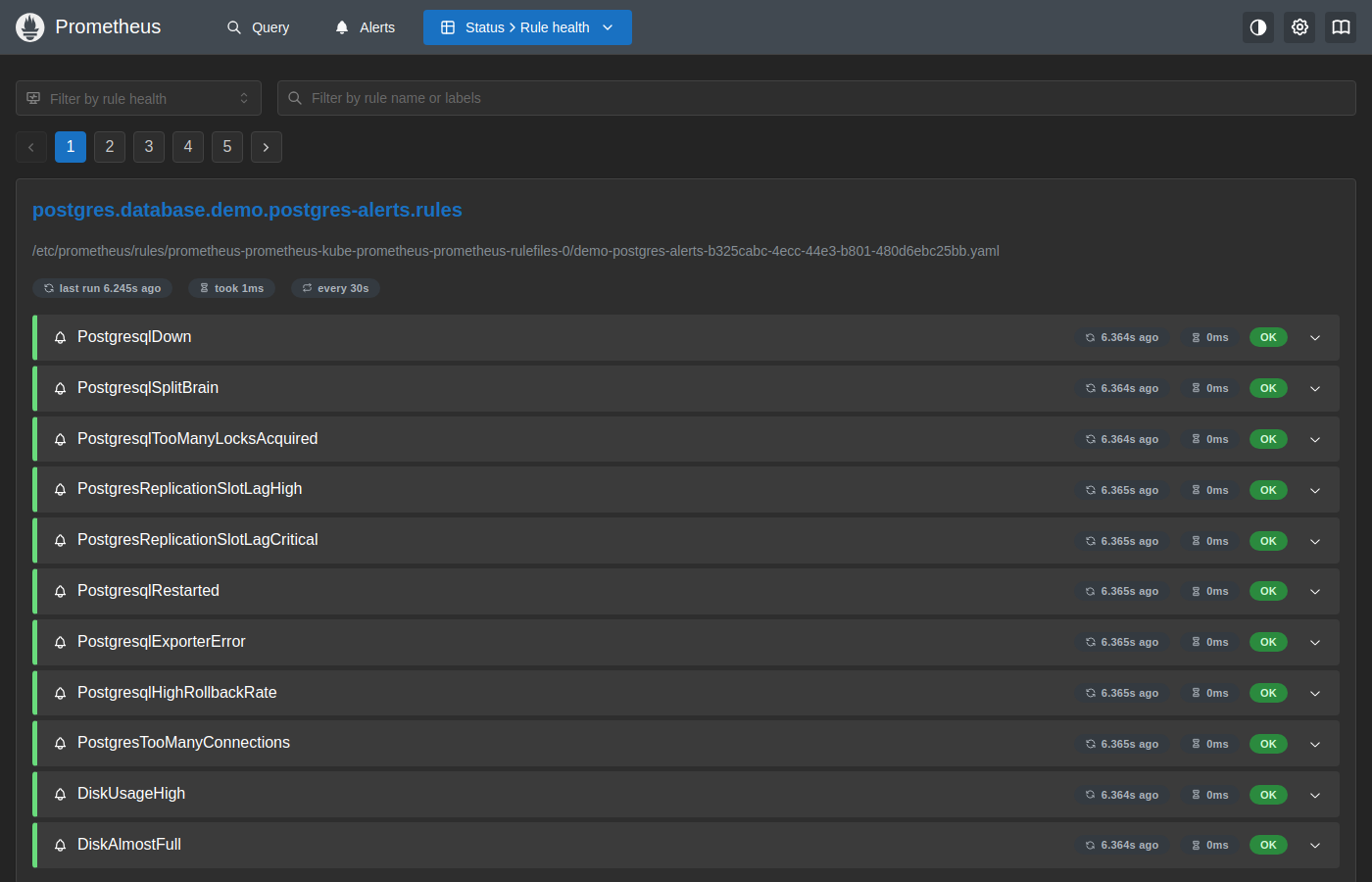
The postgres.database.demo.postgres-alerts.rules group is visible with all rules showing OK, confirming that Prometheus has loaded and is evaluating the PostgreSQL alert definitions every 30 seconds.
Step 2 — Install kubedb-grafana-dashboards
The kubedb-grafana-dashboards chart creates GrafanaDashboard CRDs containing pre-built PostgreSQL dashboard JSON. These are automatically provisioned into Grafana.
Create a Grafana service account token
The chart needs a Grafana API key to push dashboards.
# Port-forward Grafana
$ kubectl port-forward -n monitoring svc/prometheus-grafana 3000:80

# Create a service account with Admin role
$ curl -s -X POST -H "Content-Type: application/json" \
    -u admin:<grafana-admin-password> \
    http://localhost:3000/api/serviceaccounts \
    -d '{"name":"kubedb-dashboards","role":"Admin"}'
# Note the returned "id"

# Create a token for the service account (replace <id>)
$ curl -s -X POST -H "Content-Type: application/json" \
    -u admin:<grafana-admin-password> \
    http://localhost:3000/api/serviceaccounts/<id>/tokens \
    -d '{"name":"kubedb-token","secondsToLive":0}'
# Note the returned "key"

$ kill %1
Tip: Retrieve the Grafana admin password from its secret:
$ kubectl get secret -n monitoring prometheus-grafana \
    -o jsonpath='{.data.admin-password}' | base64 -d && echo
Install
Only featureGates.Postgres=true is enabled to stay within Helm’s 1 MB secret size limit.
$ helm repo add appscode https://charts.appscode.com/stable/
$ helm repo update appscode

$ helm upgrade -i kubedb-grafana-dashboards appscode/kubedb-grafana-dashboards \
    -n kubeops \
    --create-namespace \
    --version=v2026.6.18-rc.2 \
    --set featureGates.Postgres=true \
    --set grafana.url="http://prometheus-grafana.monitoring.svc:80" \
    --set grafana.apikey="<token-key-from-above>"
Verify dashboards are created
$ kubectl get grafanadashboards -n kubeops
NAME                       TITLE                          STATUS   AGE
kubedb-postgres-database   KubeDB / Postgres / Database            2m
kubedb-postgres-pod        KubeDB / Postgres / Pod                 2m
kubedb-postgres-summary    KubeDB / Postgres / Summary             2m
Verify End-to-End
1. Check the exporter is running
The exporter sidecar inside each PostgreSQL pod serves metrics at :56790/metrics. A value of pg_up 1 confirms the exporter can reach PostgreSQL.
$ kubectl exec -n demo pg-grafana-demo-0 -c exporter -- \
    wget -qO- localhost:56790/metrics | grep pg_up
pg_up 1
2. Check the Prometheus target is UP
Port-forward Prometheus and open the Status → Target health page.
$ kubectl port-forward -n monitoring \
    svc/prometheus-kube-prometheus-prometheus 9090:9090
Open http://localhost:9090/targets?search=pg-grafana-demo.
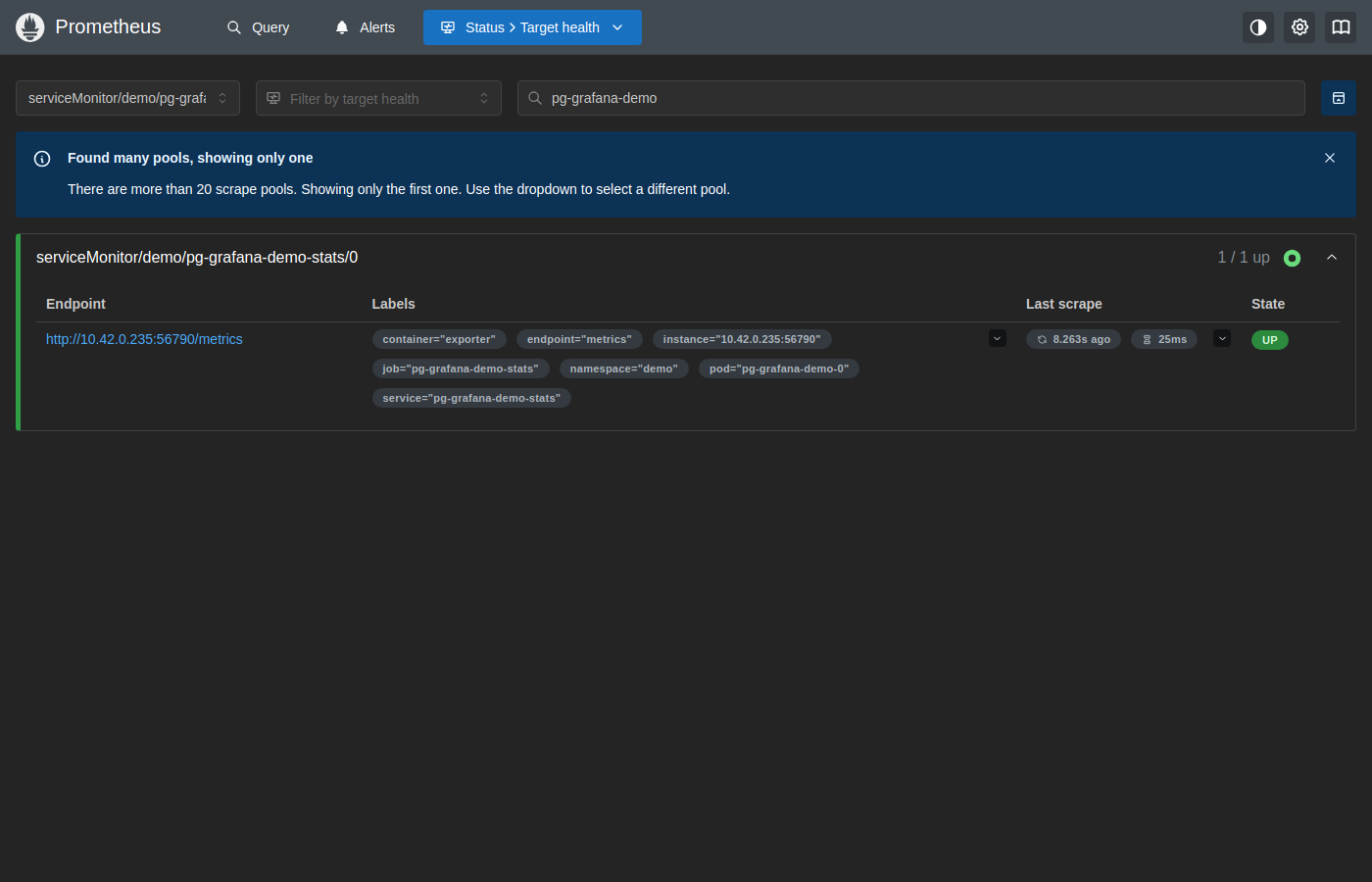
The target serviceMonitor/demo/pg-grafana-demo-stats/0 shows UP with labels confirming metrics come from pg-grafana-demo-0 in the demo namespace, scraped 8 seconds ago in 25ms.
3. Confirm all PostgreSQL alerts are inactive
Open http://localhost:9090/alerts?search=postgres to see the PostgreSQL alert groups.
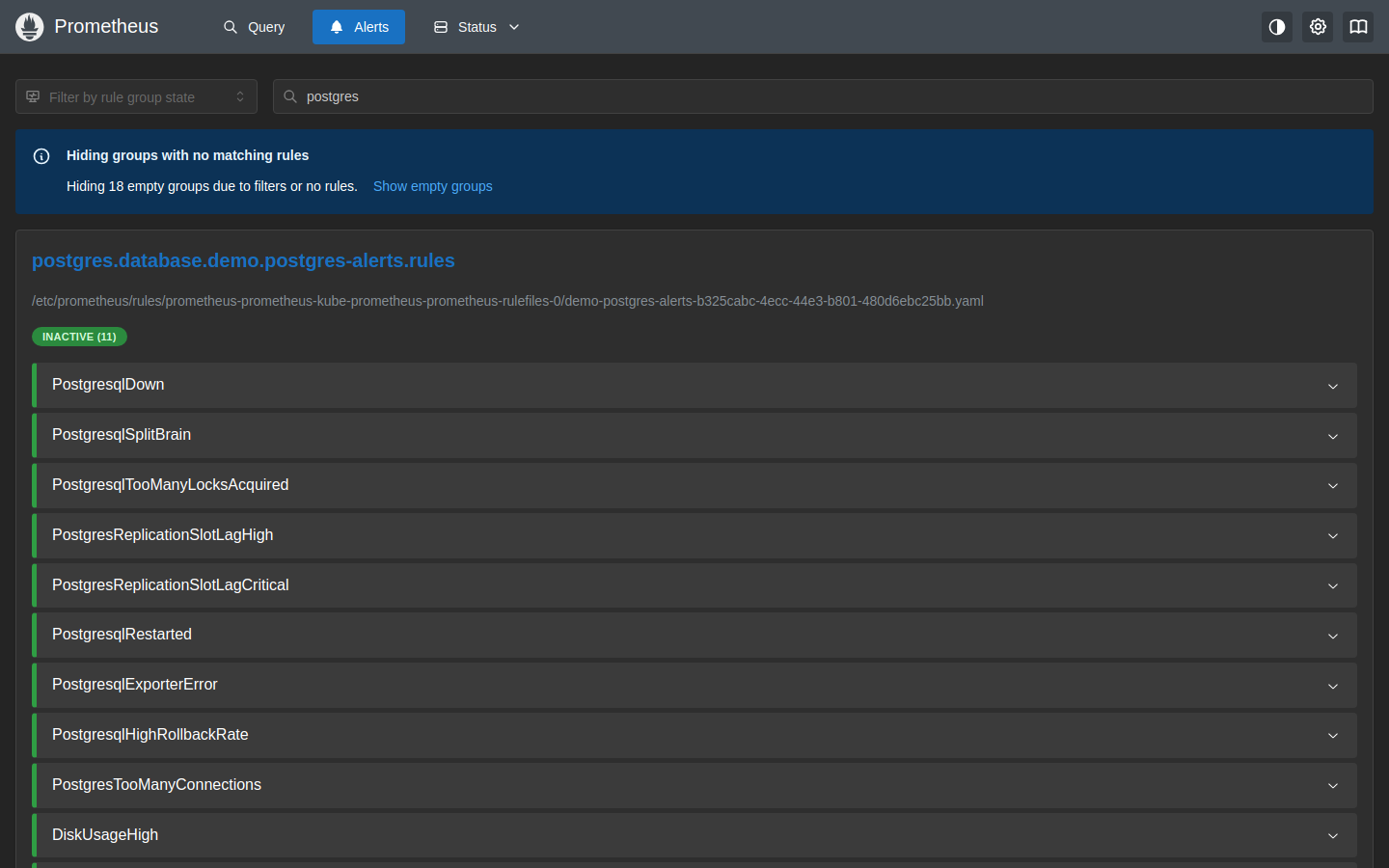
All 11 rules in the postgres.database group show INACTIVE (11), meaning the database is healthy and no thresholds are breached.
4. Check AlertManager
Port-forward AlertManager to view any currently firing alerts.
$ kubectl port-forward -n monitoring \
    svc/prometheus-kube-prometheus-alertmanager 9093:9093
Open http://localhost:9093.
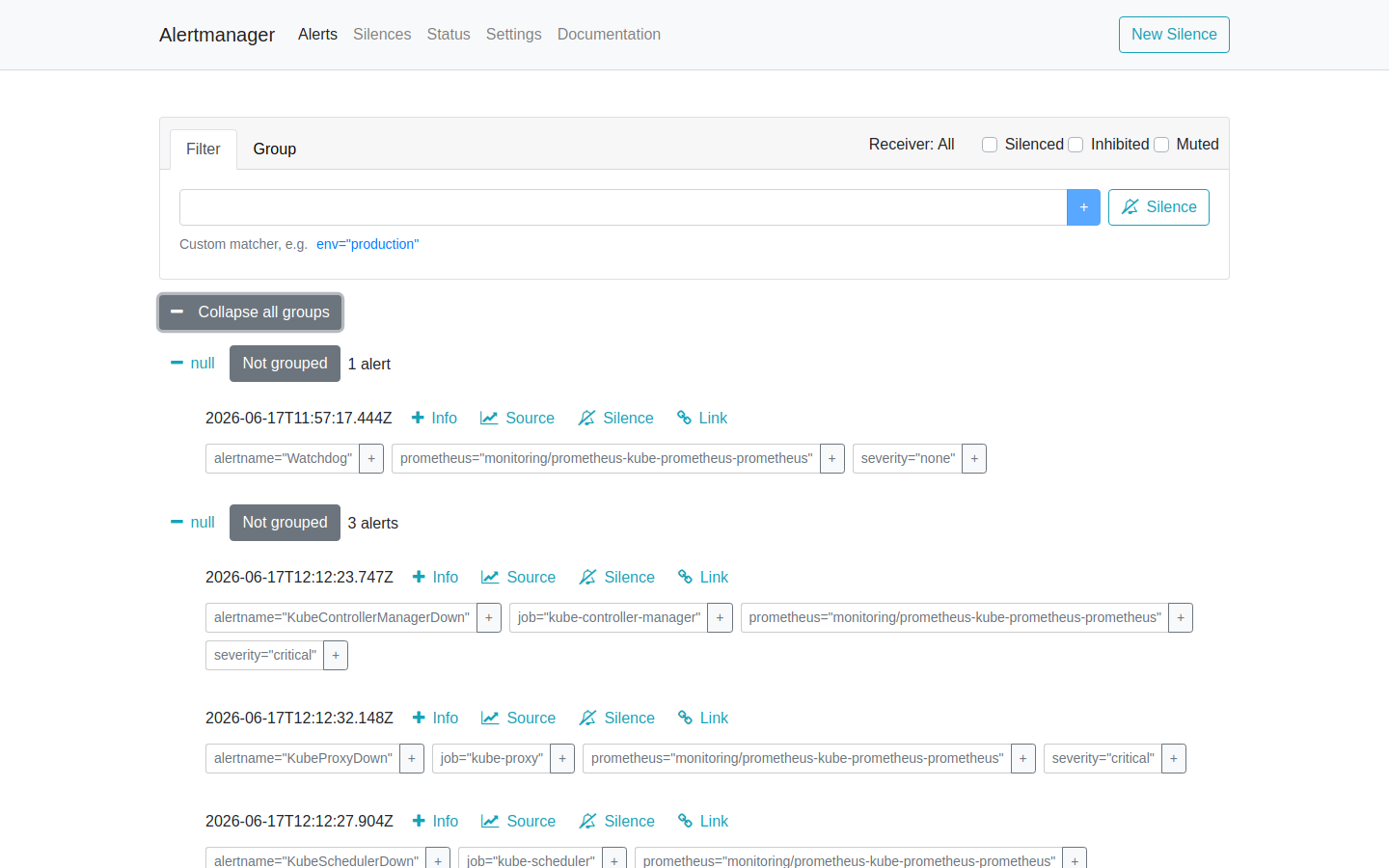
Note for k3s users: You may see
KubeProxyDown,KubeControllerManagerDown, andKubeSchedulerDownalerts. These are k3s-specific — the control plane components do not expose Prometheus scrape endpoints by default. They are not related to PostgreSQL. To silence them, add a silence rule in AlertManager or setkubeProxy.enabled: false,kubeControllerManager.enabled: false, andkubeScheduler.enabled: falsein your kube-prometheus-stack Helm values.
5. Explore Grafana dashboards
Port-forward Grafana and log in.
$ kubectl port-forward -n monitoring svc/prometheus-grafana 3000:80
Open http://localhost:3000 (username: admin). Search for postgres in the Dashboards section.
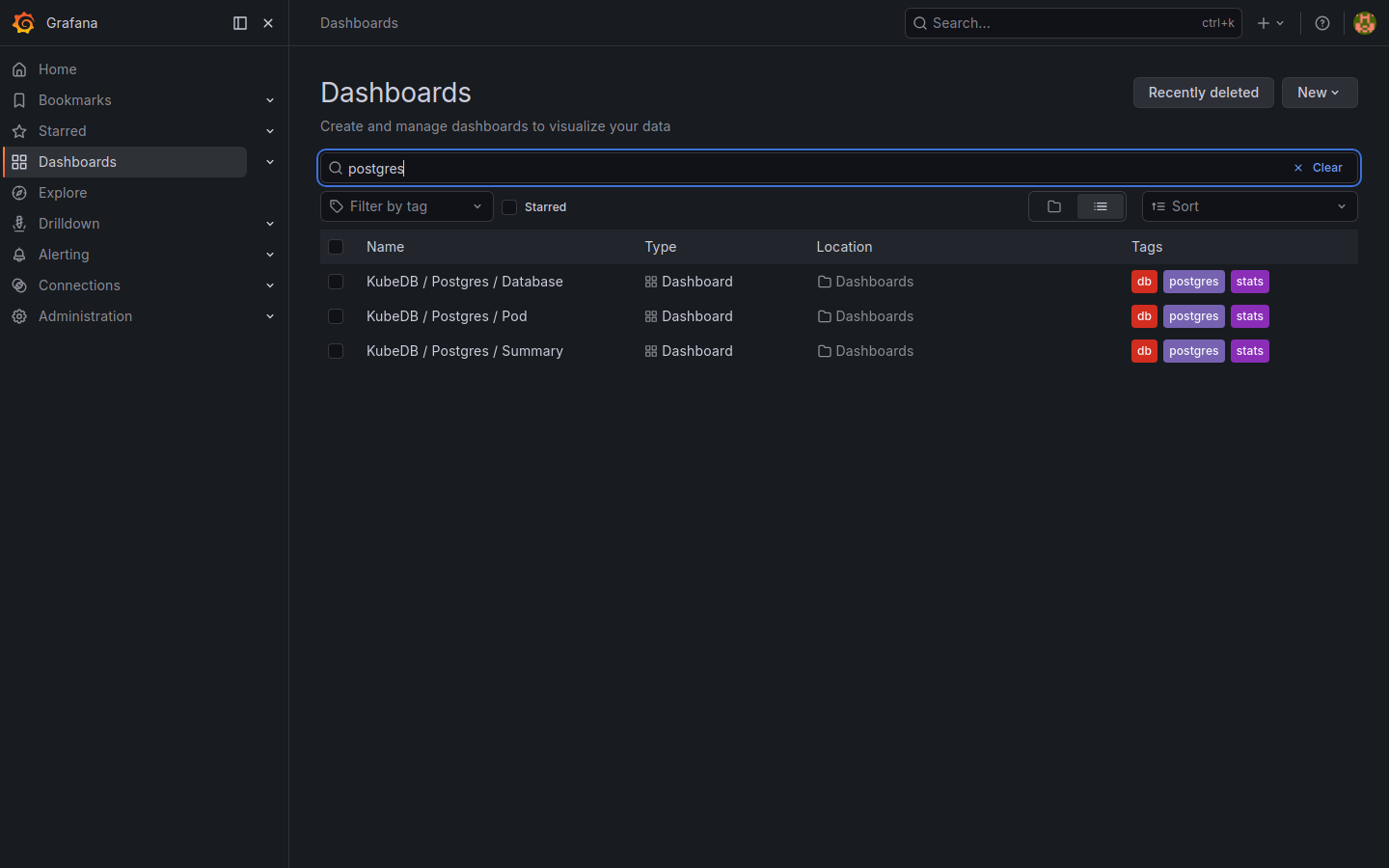
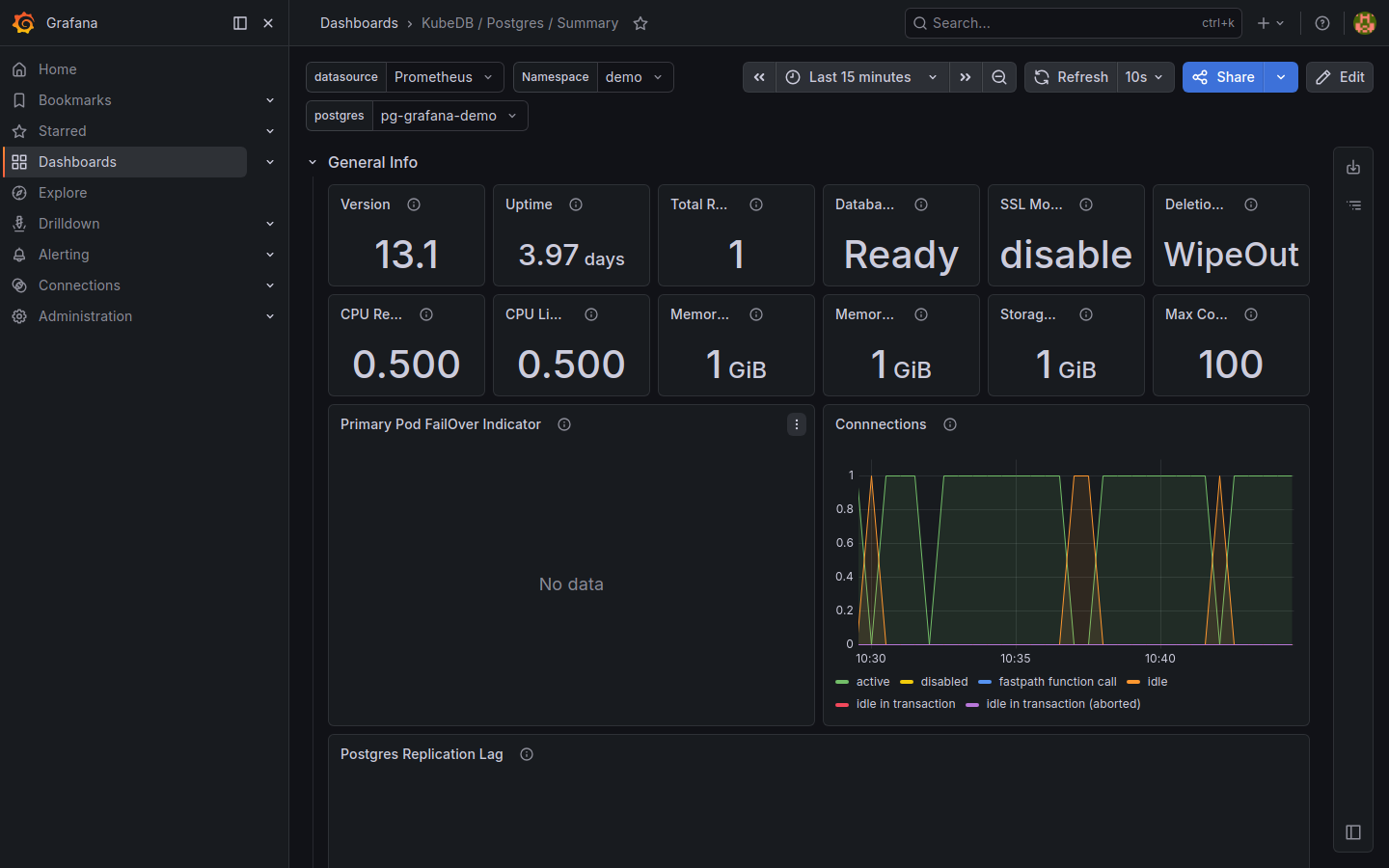
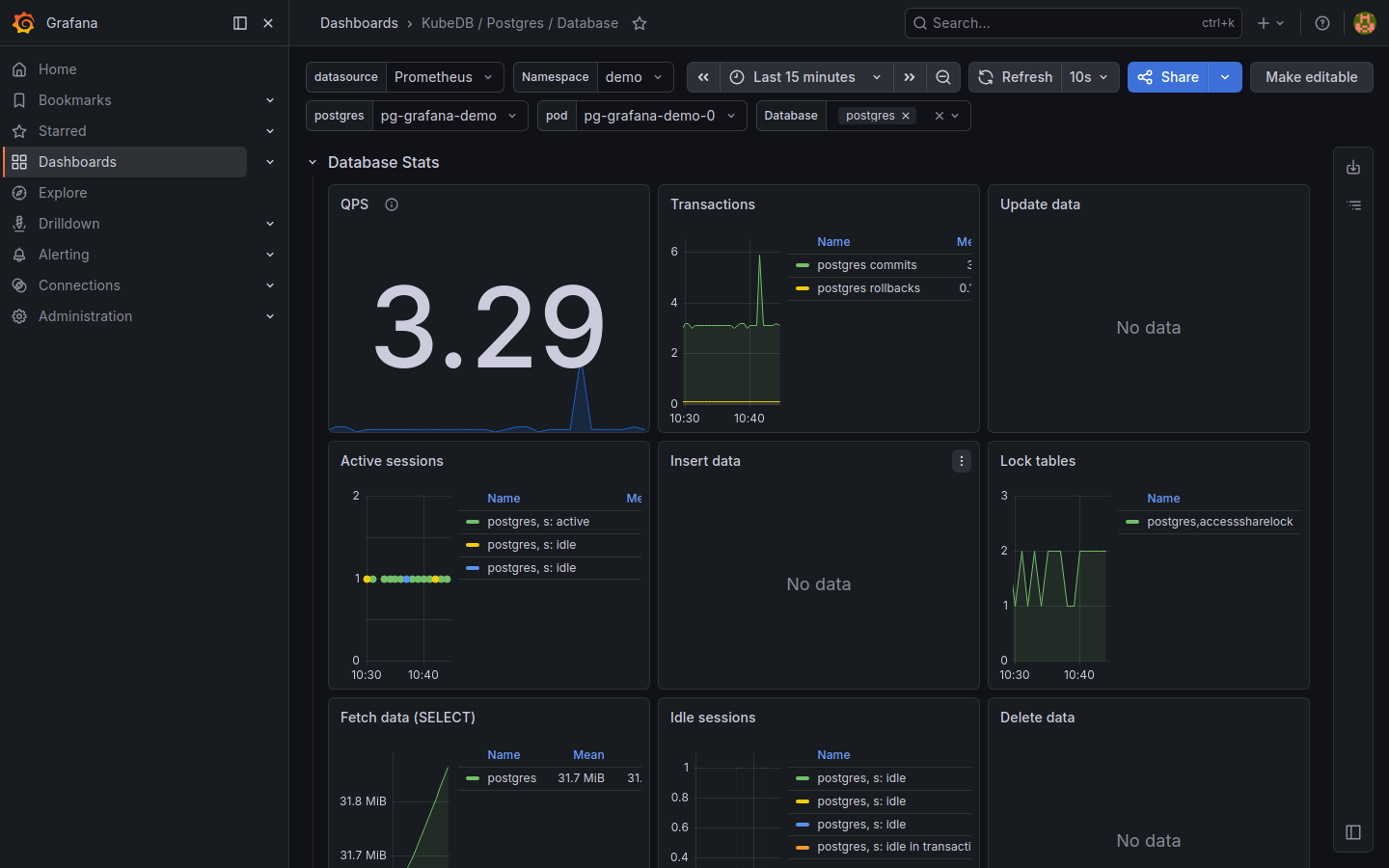
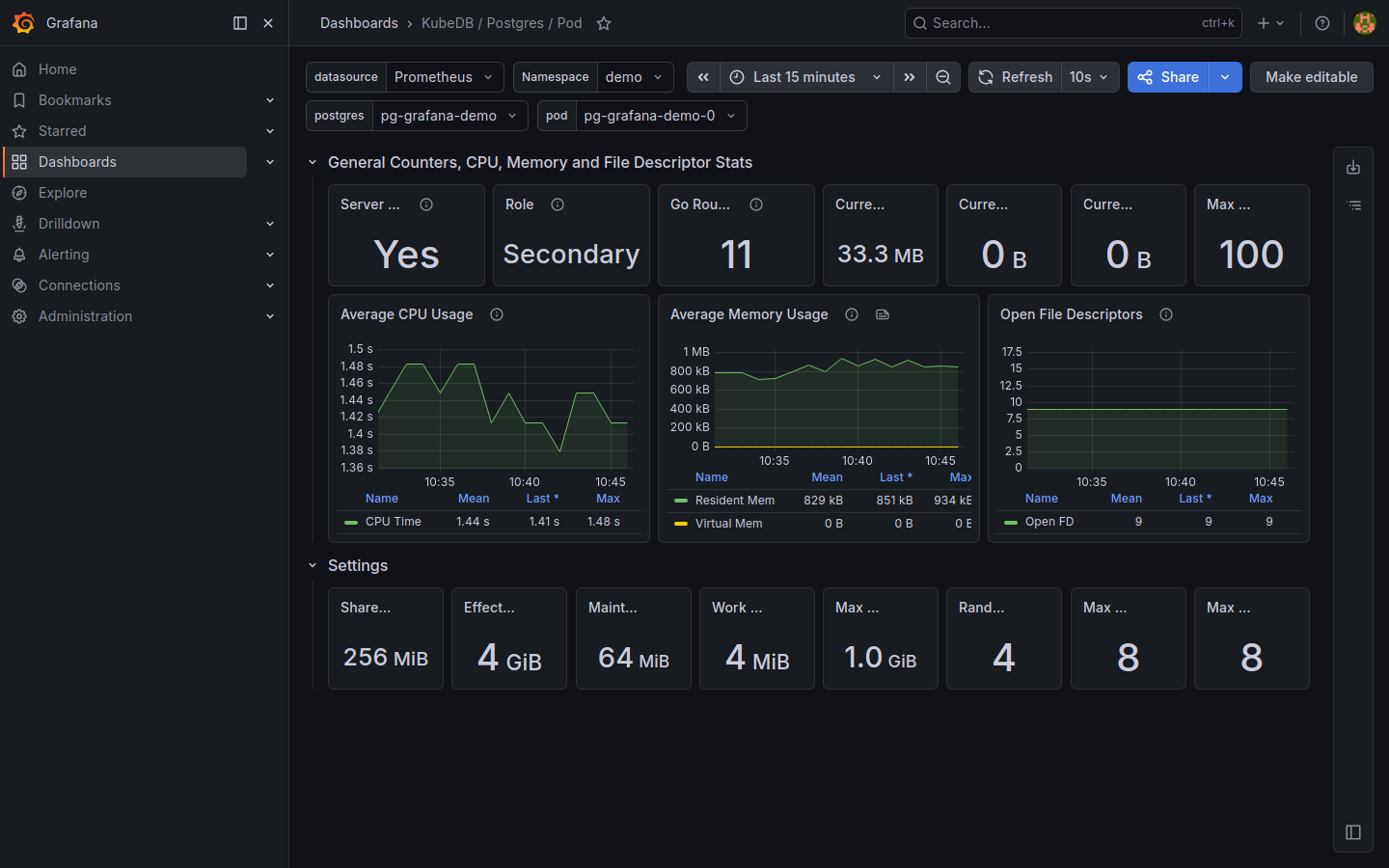
Three pre-built dashboards are available. The Namespace and postgres drop-downs at the top of each dashboard let you switch between instances.
KubeDB / Postgres / Summary — high-level health: version, uptime, replica count, database phase, connection count, and replication lag.
KubeDB / Postgres / Database — query rates (QPS), transactions (commits vs rollbacks), active sessions, lock tables, and fetch/insert data throughput.
KubeDB / Postgres / Pod — pod-level CPU usage, memory usage (resident vs virtual), open file descriptors, and PostgreSQL runtime settings (shared buffers, work_mem, max_connections).
Simulating a Firing Alert
The previous section confirmed that all alerts are INACTIVE while the database is healthy. This section walks through deliberately triggering the PostgresqlDown critical alert so you can observe the full alert lifecycle — from firing in Prometheus through to the AlertManager dashboard — and then resolve it.
1. Stop the PostgreSQL pod
Scale the PostgreSQL StatefulSet to zero replicas. The postgres_exporter sidecar will stop responding and pg_up will drop to 0 on the next scrape.
$ kubectl scale statefulset -n demo pg-grafana-demo --replicas=0
statefulset.apps/pg-grafana-demo scaled
Wait 30–60 seconds for the next Prometheus scrape cycle (configured at 10 s) and rule-evaluation cycle (30 s) to register the failure.
2. Watch the alert fire in Prometheus
Port-forward Prometheus if it is not already running.
$ kubectl port-forward -n monitoring \
    svc/prometheus-kube-prometheus-prometheus 9090:9090
Open http://localhost:9090/alerts?search=postgres.
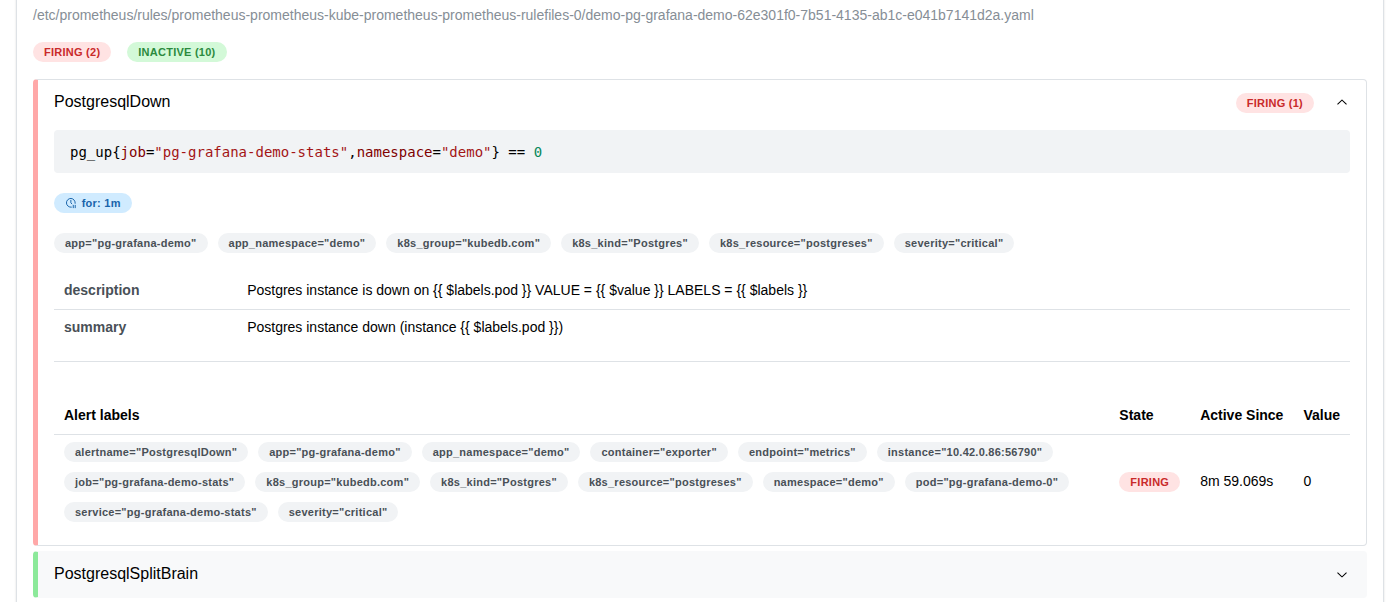
The PostgresqlDown alert transitions through three states:
| State | Colour | Meaning |
|---|---|---|
| INACTIVE | grey | Expression is false — database is up |
| PENDING | yellow | Expression is true but the for window has not elapsed |
| FIRING | red | Expression has been true for the full for duration — alert is sent to AlertManager |
Because PostgresqlDown has for: 0m (instant), it moves directly from INACTIVE to FIRING within one evaluation cycle.
3. Check the AlertManager dashboard
Port-forward AlertManager if it is not already running.
$ kubectl port-forward -n monitoring \
    svc/prometheus-kube-prometheus-alertmanager 9093:9093
Open http://localhost:9093.
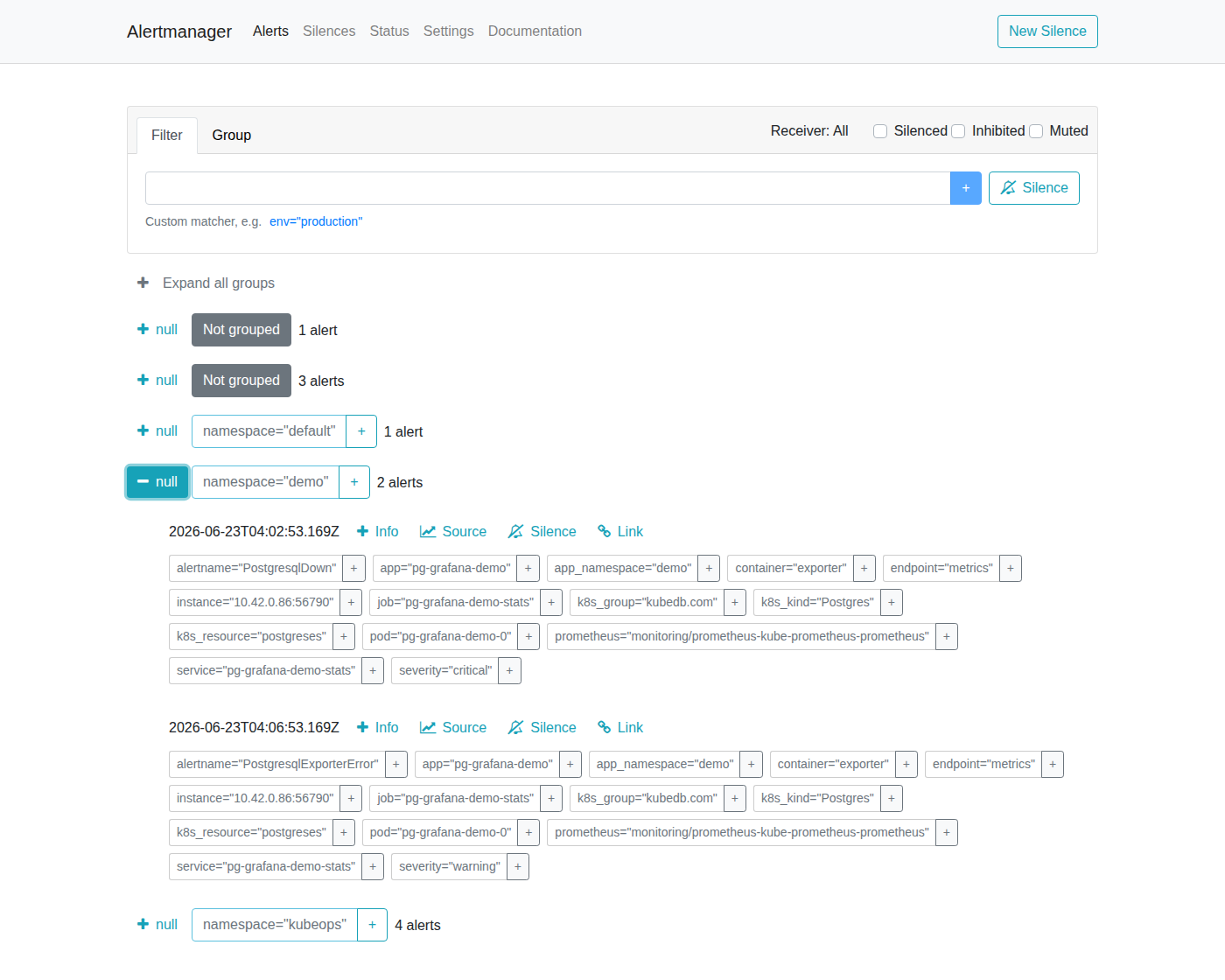
AlertManager shows the PostgresqlDown alert grouped by namespace and job. The alert card displays:
- Severity:
critical - Instance:
pg-grafana-demo-0in thedemonamespace - Source: link back to the Prometheus expression that fired the alert
- Started: timestamp when the alert first fired
AlertManager routes this alert to every receiver configured in your alertmanagerConfig (Slack, email, PagerDuty, webhook, etc.) based on your routing tree. If no receiver is configured, the alert is visible here but silently dropped.
4. Restore the PostgreSQL pod
Scale the StatefulSet back to 1 to resolve the alert.
$ kubectl scale statefulset -n demo pg-grafana-demo --replicas=1
statefulset.apps/pg-grafana-demo scaled
Wait for the pod to become Running and for the next scrape cycle to register pg_up 1.
$ kubectl get pods -n demo -w
NAME                READY   STATUS    RESTARTS   AGE
pg-grafana-demo-0   2/2     Running   0          45s
Once pg_up returns to 1, Prometheus marks the alert INACTIVE again and AlertManager sends a resolved notification to all receivers. The AlertManager dashboard will show no active alerts for the instance.
Alert Reference
All alerts are scoped to the pg-grafana-demo instance in the demo namespace via the PromQL label filters job="pg-grafana-demo-stats" and namespace="demo".
Database Group
Fired based on live metrics from postgres_exporter.
| Alert | Severity | For | What It Means |
|---|---|---|---|
PostgresqlDown | critical | instant | Exporter cannot reach PostgreSQL — instance is down or exporter crashed. |
PostgresqlSplitBrain | critical | instant | More than one node reports as primary — data divergence risk in a replica set. |
PostgresqlTooManyLocksAcquired | critical | 2m | Lock table nearly full; transactions may fail with “out of shared memory”. |
PostgresReplicationSlotLagHigh | warning | 1m | Replication slot consumer is falling behind; WAL is accumulating (>800 MB). |
PostgresReplicationSlotLagCritical | critical | 1m | Slot lag is critical — disk exhaustion or slot invalidation imminent (>1.2 GB). |
PostgresqlRestarted | critical | instant | PostgreSQL restarted within the last minute. |
PostgresqlExporterError | warning | 5m | Exporter has errors — metrics may be missing or stale. |
PostgresqlHighRollbackRate | warning | instant | High proportion of transactions are rolling back — application errors or lock contention. |
PostgresTooManyConnections | warning | 2m | Connection pool nearly exhausted (>95% of max_connections). |
DiskUsageHigh | warning | 1m | PVC used space exceeds 80% — plan for expansion. |
DiskAlmostFull | critical | 1m | PVC almost full (>95%) — PostgreSQL may become read-only or crash. |
Provisioner Group
Monitors the KubeDB operator’s view of the Postgres resource phase.
| Alert | Severity | For | What It Means |
|---|---|---|---|
KubeDBPostgreSQLPhaseNotReady | critical | 1m | KubeDB marked the Postgres resource NotReady — operator cannot reach the database. |
KubeDBPostgreSQLPhaseCritical | warning | 15m | One or more replicas are down; cluster is degraded but primary is still up. |
OpsManager Group
Tracks PostgresOpsRequest lifecycle during upgrades, scaling, reconfiguration, and certificate rotations.
| Alert | Severity | For | What It Means |
|---|---|---|---|
KubeDBPostgreSQLOpsRequestStatusProgressingToLong | critical | 30m | An ops request has been running for 30+ minutes — likely stuck. |
KubeDBPostgreSQLOpsRequestFailed | critical | instant | An ops request failed — check the OpsRequest object for the error. |
Backup & Restore Groups (Stash / KubeStash)
Two parallel sets of alerts cover both the legacy Stash and current KubeStash backup frameworks.
| Alert | Severity | What It Means |
|---|---|---|
PostgreSQL*BackupSessionFailed | critical | A scheduled backup run failed — check BackupSession logs. |
PostgreSQL*RestoreSessionFailed | critical | A restore operation failed. |
PostgreSQL*NoBackupSessionForTooLong | critical | No successful backup in the expected window — backup may be misconfigured or stuck. |
PostgreSQL*RepositoryCorrupted | critical | Backup repository integrity check failed — backups may be unrestorable. |
PostgreSQL*RepositoryStorageRunningLow | warning | Backup storage has less than 10 GB free. |
PostgreSQL*BackupSessionPeriodTooLong | warning | Backup took longer than 30 minutes. |
PostgreSQL*RestoreSessionPeriodTooLong | warning | Restore took longer than 30 minutes. |
SchemaManager Group
Monitors PostgresDatabase schema lifecycle objects managed by KubeDB Schema Manager.
| Alert | Severity | For | What It Means |
|---|---|---|---|
KubeDBPostgreSQLSchemaPendingForTooLong | warning | 30m | Schema object stuck in Pending — may be waiting on a dependency. |
KubeDBPostgreSQLSchemaInProgressForTooLong | warning | 30m | Schema migration running for 30+ minutes — may be stuck. |
KubeDBPostgreSQLSchemaTerminatingForTooLong | warning | 30m | Schema deletion stuck — a finalizer may be blocking it. |
KubeDBPostgreSQLSchemaFailed | warning | instant | Schema operation failed. |
KubeDBPostgreSQLSchemaExpired | warning | instant | A schema with a TTL has expired and been revoked. |
Customising Alerts
To override thresholds or disable specific alert groups, create a custom values file and upgrade the chart.
# custom-alerts.yaml
form:
  alert:
    labels:
      release: prometheus
    groups:
      database:
        enabled: warning
        rules:
          postgresqlTooManyConnections:
            enabled: true
            duration: "5m"
            val: 90        # fire at 90% instead of the default 95%
            severity: warning
      stash:
        enabled: "none"    # disable all stash backup alerts
$ helm upgrade postgres-alerts oci://ghcr.io/appscode-charts/postgres-alerts \
    -n demo \
    --version=v2026.2.24 \
    --set metadata.release.name=pg-grafana-demo \
    --set metadata.release.namespace=demo \
    -f custom-alerts.yaml
Cleaning up
To remove all resources created in this tutorial, run the following commands.
# Remove the Grafana dashboards
$ helm uninstall kubedb-grafana-dashboards -n kubeops

# Remove the postgres-alerts
$ helm uninstall postgres-alerts -n demo

# Remove the PostgreSQL instance
$ kubectl delete postgres -n demo pg-grafana-demo

# Delete namespaces
$ kubectl delete ns demo
$ kubectl delete ns kubeops
Next Steps
- Monitor your PostgreSQL database with KubeDB using builtin Prometheus.
- Monitor your PostgreSQL database with KubeDB using Prometheus operator.
- Learn about backup and restore PostgreSQL databases using Stash.
- Use private Docker registry to deploy PostgreSQL with KubeDB.
- Want to hack on KubeDB? Check our contribution guidelines.